
Appearance
车行管家 OpenAPI 文档 V1.1
1、接入指南
1.1、概述
本文档目的是方便第三方应用系统对接车行管家,包括但不限于停车费用查询、优惠券操作、多位多车分组操作等。与车行管家对接的所有第三方服务,需要查询停车费用并支付通知、多位多车配置、优惠券配置等,均适用本文档。
1.2、账号申请
有意向接入泊时易开放平台的第三方开发者,请先联系商务人员,获得接入泊时易开放平台所需要的 client_id 和 client_secret 信息。
1.3、API调用方式
1.3.1、接口时序图
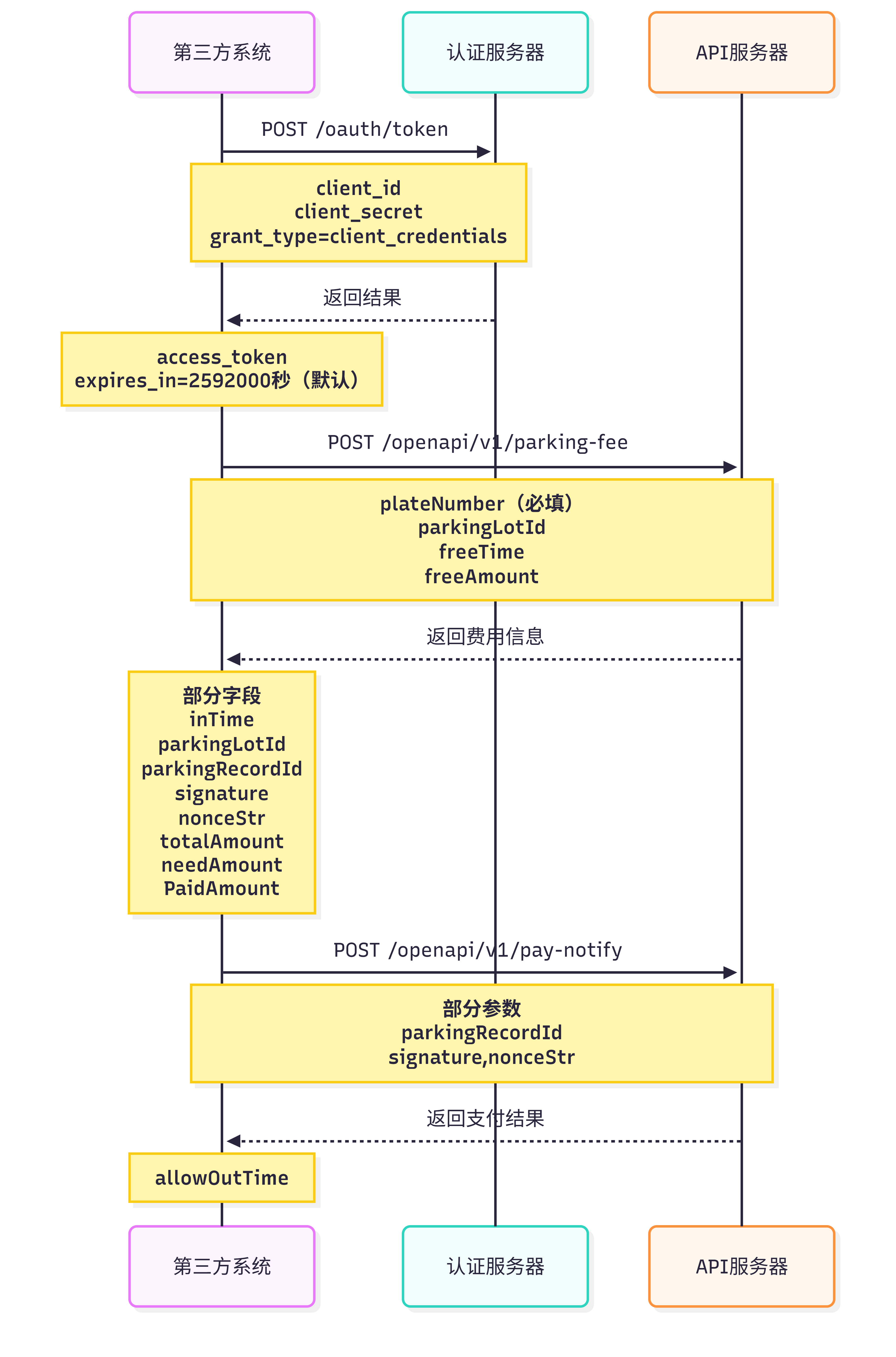
1.3.2、测试环境
| 域名变量 | 接口地址 |
|---|---|
| auth-host | https://test-parking-open.boshiyi.com |
| parking-host | https://test-parking-open.boshiyi.com/vanke-api |
1.3.3、API调用规则
通过 HTTP 请求调用开放平台 API。
请求开放 API 时,必须在请求 API 对应的 URL 地址通过地址栏参数传递以下参数:
| 参数名 | 参数类型 | 是否必需 | 描述 |
|---|---|---|---|
| access_token | string | 是 | OAUTH2.0 验证授权后获得的 token |
例如:
https://{{parking-host}}/openapi/v1/test?access_token=oauth2.0验证授权后获得的token获取 token
该接口一天限制调用15次,每次调用会延长过期时间。
首先获取您的 api_key 和 api_secret,然后请求(推荐使用 POST,Content-type: multipart/form-data):
http://{{auth-host}}/oauth/token换取 token,并带上以下参数:
| 参数名 | 参数类型 | 是否必需 | 描述 |
|---|---|---|---|
| client_id | string | 是 | api_key |
| client_secret | string | 是 | api_secret |
| grant_type | string | 是 | 固定值:client_credentials |
例如:
https://{{auth-host}}/oauth/token?grant_type=client_credentials&client_id=您的api_key&client_secret=您的api_secret返回结果示例:
json
{
  "access_token": "6ea381e3-4362-442e-b5d0-45f16d9d94f8",
  "token_type": "bearer",
  "expires_in": 2592000,
  "scope": "public"
}
如果请求错误,服务器将返回 JSON 文本包含以下参数:
- error:错误码
- error_description:错误描述信息
json
{
  "error": "invalid_client",
  "error_description": "unknown client id"
}
通用返回值
API 返回的为一个 JSON 字符串,通用的返回值如下:
| 参数名 | 参数类型 | 描述 |
|---|---|---|
| requestId | string | 用于区分每一次请求的唯一的字符串 |
| responseCode | string | 响应的错误代码,正常为00 |
| responseMessage | string | 错误信息的描述 |
| success | boolean | 本次请求是否成功 |
1.3.4、特定接口 signature 参数说明
特定接口处理。例如,在 2.1 第三方缴费接口中,停车费用查询返回中有 signature 字段,那在支付通知的接口,需要原封不动的传回 signature。
2、API列表
2.1、第三方缴费接口
2.1.1、停车费用查询
描述
根据车牌查询停车费用,包括正常停车记录的费用。此费用只保留5分钟,如果超时未调用支付通知的接口,需要再次调用该接口。
注意事项
- 费用查询为0元时需要第三方自行判断处理,不应发送支付通知
- 支付限制在五分钟之内,即查询费用到支付时间若超过五分钟,我方不允许进行更新订单操作,因此超过五分钟的订单第三方应不允许支付
- 用户支付在五分钟内,但是通知到我方超过了五分钟,因此建议对于第二点中支付时间的限制要考虑两方之间的通信时间,留出富余量
调用的URL
http://{{parking-host}}/openapi/v1/parking-fee调用方法
POST
请求参数
| 参数名 | 参数类型 | 是否必需 | 描述 |
|---|---|---|---|
| plateNumber | string | 是 | 车牌号 |
| parkingLotId | int | 否 | 停车场id |
| freeTime | int | 否 | 免费时长(分钟) |
| freeAmount | double | 否 | 免费金额,两位小数 |
请求示例
json
{
  "plateNumber": "闽D12345",
  "parkingLotId": 1,
  "freeTime": 60,
  "freeAmount": 12.1
}
响应参数
| 参数名 | 参数类型 | 描述 |
|---|---|---|
| inTime | string | 入场时间 yyyy-MM-dd HH:mm:ss |
| parkingLotId | int | 停车场id |
| parkingRecordId | int | 停车记录id |
| signature | string | 签名,在支付通知的接口,需要原封不动的传回 |
| nonceStr | string | 随机字符串,在支付通知的接口,需要原封不动的传回 |
| totalAmount | double | 总金额(未支付+已支付+优惠总金额),两位小数 |
| needAmount | double | 总共需要支付的费用,保留两位小数 |
| paidAmount | double | 已支付金额,两位小数 |
| freeTimeDeductAmount | double | 免费时长抵扣金额,两位小数 |
| deductionAmount | double | 优惠总金额,两位小数,等于免费金额+免费时长抵扣金额 |
响应示例
json
{
  "requestId": "68fa297e-e648-4534-9a4b-5c820d1e53e0",
  "responseCode": "00",
  "responseMessage": "处理成功",
  "data": {
    "inTime": "2018-05-24 14:50:00",
    "needAmount": "30.00",
    "parkingLotId": 1,
    "parkingLotName": "厦门万科云玺",
    "parkingRecordId": 1627030,
    "signature": "1d8b86279b2812a9eed6053829be678f",
    "nonceStr": "1527232785466-6407f36f36af496185884c5a54f22bcc",
    "totalAmount": "60",
    "paidAmount": "0",
    "freeTimeDeductAmount": "10",
    "deductionAmount": "30"
  },
  "success": true
}
2.1.2、支付通知
描述
第三方支付成功后,调用支付成功通知接口给 Vpark
调用的URL
http://{{parking-host}}/openapi/v1/pay-notify调用方法
POST
请求参数
| 参数名 | 参数类型 | 描述 |
|---|---|---|
| parkingRecordId | string | 查询停车费用返回的停车记录的id |
| signature | string | 查询停车费用返回的signature |
| nonceStr | string | 查询停车费用返回的nonceStr |
| needAmount | double | 需要支付的金额,两位小数 |
| deductionAmount | double | 优惠总金额,两位小数 |
| parkingLotId | int | 停车场id |
| payTime | string | 支付时间 yyyy-MM-dd HH:mm:ss |
| billType | string | 账单类型,目前固定值为 parking |
| payDetails | list | 支付详情 |
payDetails
| 参数名 | 参数类型 | 描述 |
|---|---|---|
| payWay | int | 支付方式,查看对照表 |
| orderNo | string | 支付的商户定单号 |
| thirdTradeNo | string | 支付宝、微信等交易编号(0元支付为空) |
| payAmount | double | 支付金额,保留两位小数 |
请求示例
json
{
  "parkingRecordId": 1627030,
  "parkingLotId": 1,
  "needAmount": "30",
  "deductionAmount": "30",
  "signature": "1dac8ee165a1922299a7e59fdd6a15d3",
  "nonceStr": "1527235510170-77e57f84d9e24d189c3a9f0252d51a7b",
  "payTime": "2018-05-24 12:32:12",
  "billType": "parking",
  "payDetails": [
    {
      "payWay": 0,
      "orderNo": "0000000",
      "thirdTradeNo": "00000000",
      "payAmount": 30.00
    },
    {
      "payWay": 16,
      "orderNo": "0000001",
      "payAmount": 30.00
    }
  ]
}
响应参数
| 参数名 | 参数类型 | 描述 |
|---|---|---|
| allowOutTime | String | 允许免费出场的时间 |
响应示例
json
{
  "requestId": "e8ed0c9d-426b-4dac-a054-393b6d02e46b",
  "responseCode": "00",
  "responseMessage": "处理成功",
  "data": {
    "allowOutTime": "2018-06-12 15:59:21"
  },
  "success": true
}
2.1.3、查询停车记录
描述
第三方可根据车牌号码,查询车牌号码在 Vpark 平台中的停车记录,可返回的停车记录为单车场
调用的URL
http://{{parking-host}}/openapi/v1/parking-record调用方法
POST
请求参数
| 参数名 | 参数类型 | 是否必需 | 描述 |
|---|---|---|---|
| plateNumber | string | 是 | 车牌号 |
| parkingLotId | int | 否 | 停车场id |
| pageNo | int | 否 | 分页的当前页数,1为第1页 |
| pageSize | int | 否 | 分页的大小 |
请求示例
json
{
  "pageNo": 1,
  "pageSize": 10,
  "plateNumber": "闽S22222",
  "parkingLotId": 1
}
响应参数
| 参数名 | 参数类型 | 描述 |
|---|---|---|
| plateNumber | string | 车牌号 |
| parkingLotName | string | 停车场名称 |
| parkingLotId | int | 停车场id |
| sumAmount | string | 总费用,保留两位小数 |
| inTime | string | 入场时间 yyyy-MM-dd HH:mm:ss |
| outTime | string | 出场时间 yyyy-MM-dd HH:mm:ss |
| lastPayTime | string | 最后支付时间 yyyy-MM-dd HH:mm:ss |
| payDetails | list | 支付详情 |
payDetails
| 参数名 | 参数类型 | 描述 |
|---|---|---|
| amount | double | 此支付方式支付的费用 |
| payway | int | 支付方式 |
| time | string | 支付时间 yyyy-MM-dd HH:mm:ss |
响应示例
json
{
  "requestId": "cf1cba15-2650-4459-93fb-38bcc02dff59",
  "responseCode": "00",
  "responseMessage": "处理成功",
  "rows": [
    {
      "plateNumber": "闽S22222",
      "parkingLotName": "厦门万科云玺",
      "parkingLotId": 1,
      "sumAmount": "47.40",
      "inTime": "2018-04-23 08:00:00",
      "outTime": "2018-05-23 21:26:14",
      "lastPayTime": "2018-04-24 16:41:32",
      "payDetails": [
        {
          "amount": "47.40",
          "payway": 0,
          "time": "2018-04-24 16:41:32"
        }
      ]
    }
  ],
  "total": 1,
  "success": true
}
2.2、停车优惠券接口
2.2.1、获取所有停车优惠券信息
描述
第三方获取所拥有的所有停车优惠券信息,前提是第三方已在泊时易系统建立商户并关联对应的停车优惠券信息,商户ID由泊时易提供给第三方。
调用的URL
http://{{parking-host}}/openapi/v1/coupon-info调用方法
POST
请求参数
| 参数名 | 参数类型 | 是否必需 | 描述 |
|---|---|---|---|
| deptId | int | 是 | 商户ID |
响应参数
| 参数名 | 参数类型 | 描述 |
|---|---|---|
| couponDetails | list | 优惠券信息列表 |
couponDetails
| 参数名 | 参数类型 | 描述 |
|---|---|---|
| couponName | String | 优惠券名称 |
| couponId | int | 优惠券ID |
| couponType | String | 时长优惠券(time)或金额优惠券(money) |
| couponAmount | int | 优惠券面额 |
| totalNum | int | 优惠券总量 |
| sendNum | int | 已发放数量 |
| usedNum | int | 已使用数量 |
| beginTime | String | 生效时间 |
| endTime | String | 失效时间 |
| status | String | 优惠券状态(notStart:未开始,inEffect:生效中,expired:已失效,cancel:作废) |
| version | String | 版本号 |
响应示例
json
{
  "requestId": "77fc5d95-fafe-423b-88f9-0bd2e237d003",
  "responseCode": "00",
  "responseMessage": "处理成功",
  "success": true,
  "data": {
    "couponDetails": [
      {
        "couponName": "员工优惠券",
        "couponId": 11,
        "couponType": "money",
        "couponAmount": 10,
        "totalNum": 100,
        "sendNum": 55,
        "usedNum": 50,
        "beginTime": "2018-08-31",
        "endTime": "2018-10-31",
        "status": "inEffect",
        "version": "10055inEffect@11"
      }
    ]
  }
}
2.2.2、获取商户可用停车优惠券
描述
用来查询商户可以使用的停车优惠券(要先在大客户平台,由大客户给二级商户分配抵扣券额度)
调用的url
http://{{parking-host}}/openapi/v1/usable-coupon调用方法
POST
请求参数
| 参数名 | 参数类型 | 是否必需 | 描述 |
|---|---|---|---|
| parkingLotId | int | 是 | 停车场Id |
| mchId | int | 是 | 商户Id |
| couponId | int | 否 | 券Id,用于获取特定的券 |
| quantity | int | 否 | 获取的数量,默认为1 |
请求示例
json
{
  "parkingLotId": 1,
  "mchId": 1,
  "couponId": 8574,
  "quantity": 2
}
响应参数
| 参数名 | 参数类型 | 描述 |
|---|---|---|
| qrCode | string | 抵扣券二维码 |
响应示例
json
{
  "requestId": "5d55a925-c527-44c1-8a29-a3bc276ca28a",
  "responseCode": "00",
  "responseMessage": "处理成功",
  "data": {
    "qrCode": "http://easypark-admin-dl.maysatech.com/api/openapi/inner/scan-qrcode?proxyCode=XWFFqBLTRbyxDFYEDdl&parkingLotId=1"
  },
  "success": true
}
2.2.3、停车优惠券绑定停车记录
描述
第三方调用该接口将优惠券与在场停车记录绑定,绑定后计费时即扣除优惠金额。
调用的url
http://{{parking-host}}/openapi/v1/coupon-bind调用方法
POST
请求参数
| 参数名 | 参数类型 | 是否必需 | 描述 |
|---|---|---|---|
| codeId | String | 是 | 优惠券Code |
| parkingLotId | int | 是 | 车场ID |
| plateNumber | String | 是 | 在场车辆的车牌 |
响应参数
仅返回通用返回值。
2.2.4、停车优惠券信息同步接口(非必选)
描述
第三方调用该接口,比较数据的版本信息。
第三方需要根据自己所存的优惠券信息生成版本号来进行比较,生成规则如下: version = totalNum + sendNum + status + '@' + couponId
例如,totalNum = 100, sendNum = 55, couponId = 1465, status = inEffect → version = 10055inEffect@1465
调用的url
http://{{parking-host}}/openapi/v1/coupon-sync调用方法
POST
请求参数
| 参数名 | 参数类型 | 是否必需 | 描述 |
|---|---|---|---|
| couponId | int | 是 | 优惠券Id |
| version | String | 是 | 版本号 |
响应参数
仅返回通用返回值。
2.3、免费停车权接口
2.3.1、免费停车权添加接口
描述
添加免费停车权接口,车场ID和大客户ID由泊时易提供给第三方
调用的URL
http://{{parking-host}}/openapi/v1/whiteList/add调用方法
POST
请求参数
| 参数名 | 参数类型 | 是否必需 | 描述 |
|---|---|---|---|
| name | string | 否 | 车主名称 |
| plateNumber | string | 是 | 车牌号码 |
| parkingLotId | int | 是 | 停车场ID |
| effectiveDate | string | 是 | 生效日期 yyyy-MM-dd |
| expireDate | string | 是 | 失效日期 yyyy-MM-dd |
| bigcustomerId | string | 是 | 大客户ID |
| remark | string | 否 | 备注说明 |
请求示例
json
{
  "name": "车主名称",
  "plateNumber": "闽E8C938",
  "parkingLotId": 27,
  "effectiveDate": "2018-10-23",
  "expireDate": "2018-11-23",
  "bigcustomerId": "zhanyunhotel",
  "remark": "SS"
}
响应参数
| 参数名 | 参数类型 | 描述 |
|---|---|---|
| createTime | string | 创建时间 yyyy-MM-dd HH:mm:ss |
| name | string | 车主姓名 |
| plateNumber | string | 车牌号码 |
| parkinglotId | int | 车场Id |
| effectiveDate | string | 生效日期 yyyy-MM-dd |
| expireDate | string | 失效日期 yyyy-MM-dd |
| bigcustomerId | string | 大客户id |
| id | int | 白名单id |
响应示例
json
{
  "requestId": "13cfbe39-0871-408c-8085-ad8c7ec97c96",
  "responseCode": "00",
  "responseMessage": "处理成功",
  "data": {
    "id": 146,
    "createTime": "2018-11-09 16:44:59",
    "name": "车主名称",
    "plateNumber": "闽E8C938",
    "parkingLotId": 27,
    "effectiveDate": "2018-10-23",
    "expireDate": "2018-11-23",
    "bigcustomerId": "zhanyunhotel"
  },
  "success": true
}
2.3.2、免费停车权修改接口
描述
修改免费停车权的有效期或者车牌号,在酒店场景下即用户提前退房或者续住情况下,修改免费停车权的有效期、车牌号和车主名称。
调用的URL
http://{{parking-host}}/openapi/v1/whiteList/update调用方法
POST
请求参数
| 参数名 | 参数类型 | 是否必需 | 描述 |
|---|---|---|---|
| id | int | 否 | 免费停车权ID |
| name | string | 否 | 车主名称 |
| plateNumber | string | 是 | 车牌号码 |
| parkingLotId | int | 是 | 停车场ID |
| effectiveDate | string | 是 | 生效日期 |
| expireDate | string | 是 | 失效日期 |
| bigCustomerId | string | 是 | 大客户ID |
| remark | string | 否 | 备注说明 |
请求示例
json
{
  "id": 146,
  "name": "车主名称",
  "plateNumber": "闽E8C938",
  "parkingLotId": 27,
  "effectiveDate": "2018-11-01",
  "expireDate": "2018-11-23",
  "bigcustomerId": "zhanyunhotel"
}
响应参数
| 参数名 | 参数类型 | 描述 |
|---|---|---|
| updateTime | string | 更新时间 yyyy-MM-dd HH:mm:ss |
| name | string | 车主姓名 |
| plateNumber | string | 车牌号码 |
| parkinglotId | int | 车场Id |
| effectiveDate | string | 生效日期 yyyy-MM-dd |
| expireDate | string | 失效日期 yyyy-MM-dd |
| bigcustomerId | int | 大客户id |
响应示例
json
{
  "requestId": "7ffdc620-53cb-4e6b-8df6-d02bc70043ce",
  "responseCode": "00",
  "responseMessage": "处理成功",
  "data": {
    "id": 146,
    "updateTime": "2018-11-09 16:52:32",
    "name": "车主名称",
    "plateNumber": "闽E8C938",
    "parkingLotId": 27,
    "effectiveDate": "2018-11-01",
    "expireDate": "2018-11-23",
    "bigcustomerId": "zhanyunhotel"
  },
  "success": true
}
2.3.3、免费停车权删除接口
描述
若车牌号码添加错误,可以通过删除接口删除车牌号码的免费停车权
调用的URL
http://{{parking-host}}/openapi/v1/whiteList/delete调用方法
POST
请求参数
| 参数名 | 参数类型 | 描述 |
|---|---|---|
| id | int | 免费停车权ID |
| bigcustomerId | string | 大客户ID |
请求示例
json
{
  "id": 135,
  "bigcustomerId": 258,
  "remark": "SS"
}
响应示例
json
{
  "requestId": "14fe9670-d574-43ae-a4ad-b4674751bca8",
  "responseCode": "00",
  "responseMessage": "处理成功",
  "success": true
}
2.3.4、车辆在场状态接口
描述
根据车牌号码和停车场,查询车辆是否在场
调用的URL
http://{{parking-host}}/openapi/v1/parking-status调用方法
POST
请求参数
| 参数名 | 参数类型 | 是否必需 | 描述 |
|---|---|---|---|
| plateNumber | string | 是 | 车牌号 |
| parkingLotId | int | 否 | 停车场id |
请求示例
json
{
  "plateNumber": "闽D12345",
  "parkingLotId": 1
}
响应参数
| 参数名 | 参数类型 | 描述 |
|---|---|---|
| inTime | string | 入场时间 yyyy-MM-dd HH:mm:ss |
| parkingLotId | int | 停车场id |
| parkingRecordId | int | 停车记录id |
| parkingStatus | string | 车辆状态(1在场,2不在场) |
| recordStatus | string | 记录状态(1正常,0无入场记录) |
2.4、获取车场数据接口
2.4.1、获取项目信息
描述
调用这个接口获取项目信息,若 parkingLotThirdId 为空,则返回所拥有的所有项目信息
调用的URL
http://{{parking-host}}/openapi/v1/project-info调用方法
POST
请求参数
| 参数名 | 参数类型 | 是否必需 | 描述 |
|---|---|---|---|
| parkingLotThirdId | String | 否 | 停车场编号 |
响应参数
| 参数名 | 参数类型 | 描述 |
|---|---|---|
| projectInfos | list | 项目信息列表 |
projectInfos
| 参数名 | 参数类型 | 描述 |
|---|---|---|
| parkingLotThirdId | String | 停车场编号 |
| parkingLotName | String | 停车场名称 |
| parkingLotAddr | String | 停车场地址 |
| parkingLotSpace | int | 总车位数 |
| parkingLotFreeSpace | int | 剩余车位数 |
响应示例
json
{
  "requestId": "77fc5d95-fafe-423b-88f9-0bd2e237d003",
  "responseCode": "00",
  "responseMessage": "处理成功",
  "success": true,
  "data": {
    "projectInfos": [
      {
        "parkingLotThirdId": "P10001",
        "parkingLotName": "厦门万科云玺",
        "parkingLotAddr": "福建省厦门市湖里区高林中路535号",
        "parkingLotSpace": "1000",
        "parkingLotFreeSpace": "500"
      }
    ]
  }
}
2.4.2、获取套餐购买信息
描述
调用该接口获取所拥有车场的套餐购买信息,当 parkingLotThirdId 为空时,获取所拥有的所有的车场的套餐购买信息,当 version 为空时,为全量推送。当 parkingLotThirdId 为空时,version 无效。
调用的URL
http://{{parking-host}}/openapi/v1/combo-info调用方法
POST
请求参数
| 参数名 | 参数类型 | 是否必需 | 描述 |
|---|---|---|---|
| parkingLotThirdId | String | 否 | 停车场编号 |
| version | String | 否 | 版本号 |
响应参数(数组形式)
| 参数名 | 参数类型 | 描述 |
|---|---|---|
| parkingLotThirdId | String | 停车场编号 |
| comboInfos | list | 套餐购买信息 |
| version | String | 版本信息 |
comboInfos
| 参数名 | 参数类型 | 描述 |
|---|---|---|
| comboId | int | 套餐编号 |
| plateNumber | String | 车牌号 |
| mobile | String | 手机号 |
| beginDate | Date | 套餐生效日期 |
| endDate | Date | 套餐失效日期 |
| comboName | String | 套餐名称 |
| status | String | 套餐状态 |
| updateTime | Date | 该条记录更新时间 |
响应示例
json
{
  "requestId": "77fc5d95-fafe-423b-88f9-0bd2e237d003",
  "responseCode": "00",
  "responseMessage": "处理成功",
  "data": [
    {
      "parkingLotThirdId": "P10001",
      "comboInfos": [
        {
          "comboId": 1,
          "plateNumber": "闽D66666",
          "mobile": "17522221107",
          "beginDate": "2018-08-01",
          "endDate": "2018-08-29",
          "comboName": "临停优惠包",
          "status": "invalid",
          "updateTime": "2018-09-13 10:24:24"
        }
      ],
      "version": "20180829095720@31"
    },
    {
      "parkingLotThirdId": "P10002",
      "comboInfos": [
        {
          "comboId": 1,
          "plateNumber": "闽D66666",
          "mobile": "17522221107",
          "beginDate": "2018-08-01",
          "endDate": "2018-08-29",
          "comboName": "临停优惠包",
          "status": "invalid",
          "updateTime": "2018-09-13 10:24:24"
        }
      ],
      "version": "20180829095720@31"
    }
  ],
  "success": true
}
2.4.3、获取黑名单信息
描述
调用该接口获取所拥有车场的黑名单信息,当 parkingLotThirdId 为空时,获取所拥有的所有的车场的黑名单信息,当 version 为空时,为全量推送,当 parkingLotThirdId 为空时,version 无效。
调用的URL
http://{{parking-host}}/openapi/v1/black-list调用方法
POST
请求参数
| 参数名 | 参数类型 | 是否必需 | 描述 |
|---|---|---|---|
| parkingLotThirdId | String | 否 | 停车场编号 |
| version | String | 否 | 版本号 |
响应参数(数组形式)
| 参数名 | 参数类型 | 描述 |
|---|---|---|
| parkingLotThirdId | String | 停车场编号 |
| blackList | list | 黑名单信息 |
| version | String | 版本信息 |
blackList
| 参数名 | 参数类型 | 描述 |
|---|---|---|
| plateNumber | String | 车牌号码 |
| parkingLotThirdId | String | 停车场编号 |
| effectiveDate | date | 生效日期 |
| expireDate | date | 失效日期 |
| createTime | date | 录入时间 |
| reason | String | 理由 |
| status | String | 状态 |
| updateTime | Date | 该条记录更新时间 |
2.4.4、获取白名单信息
描述
调用该接口获取所拥有车场的白名单信息,当 parkingLotThirdId 为空时,获取所拥有的所有的车场的白名单信息,当 version 为空时,为全量推送,当 parkingLotThirdId 为空时,version 无效。
调用的URL
http://{{parking-host}}/openapi/v1/white-list调用方法
POST
请求参数
| 参数名 | 参数类型 | 是否必需 | 描述 |
|---|---|---|---|
| parkingLotThirdId | String | 否 | 停车场ID |
| Version | String | 否 | 版本号 |
响应参数(数组形式)
| 参数名 | 参数类型 | 描述 |
|---|---|---|
| parkingLotThirdId | String | 停车场编号 |
| whiteList | list | 白名单信息 |
| version | String | 版本信息 |
whiteList
| 参数名 | 参数类型 | 描述 |
|---|---|---|
| name | String | 车主姓名 |
| plateNumber | String | 车牌号码 |
| parkingLotThirdId | String | 车场编号 |
| effectiveDate | date | 生效日期 |
| expireDate | date | 失效日期 |
| createTime | date | 录入时间 |
| reason | String | 理由 |
| status | String | 状态 |
| updateTime | Date | 该条记录更新时间 |
2.5、第三方提供接口
2.5.1、车场基础信息上报接口
描述
停车场基础信息,第三方获取
调用的URL
http://{{parking-host}}/调用方法
POST
请求参数
| 参数名 | 参数类型 | 是否必需 | 描述 |
|---|---|---|---|
| parkingLotId | String | 是 | 车场ID |
| parkingLotName | String | 是 | 车场名称 |
| address | String | 否 | 车场地址 |
| longitude | String | 是 | 经度 |
| latitude | String | 是 | 维度 |
| parkingSpace | String | 是 | 总车位数 |
请求示例
json
{
  "parkingLotId": "车场ID",
  "parkingLotName": "车场名称",
  "address": "车场地址",
  "longitude": "120.111111",
  "latitude": "22.222222",
  "parkingSpace": "233"
}
响应示例
json
{
  "requestId": "13cfbe39-0871-408c-8085-ad8c7ec97c96",
  "responseCode": "200",
  "responseMessage": "处理成功",
  "success": true
}
2.5.2、车辆进场数据上报接口
描述
车辆进场,上报数据至第三方平台
调用的URL
http://{{parking-host}}/调用方法
POST
请求参数
| 参数名 | 参数类型 | 是否必需 | 描述 |
|---|---|---|---|
| parkingRecordId | String | 是 | 停车记录ID |
| parkingLotId | String | 是 | 车场ID |
| parkingLotName | String | 否 | 车场名称 |
| plateNumber | String | 是 | 车牌号码 |
| plateColor | String | 否 | 车牌颜色(蓝、黄、黑、白、绿、未识别) |
| inTime | String | 是 | 进场时间 |
| inImgUrl | String | 否 | 进场识别图片地址 |
请求示例
json
{
  "parkingRecordId": "停车记录ID",
  "parkingLotId": "车场ID",
  "parkingLotName": "车场名称",
  "plateNumber": "闽E8C938",
  "plateColor": "黄色",
  "inTime": "2018-11-09 16:44:59",
  "inImgUrl": "http://www.google.com"
}
响应示例
json
{
  "requestId": "13cfbe39-0871-408c-8085-ad8c7ec97c96",
  "responseCode": "200",
  "responseMessage": "处理成功",
  "success": true
}
2.5.3、车辆离场数据上报接口
描述
车辆离场,上报数据至第三方平台
调用的URL
http://{{parking-host}}/调用方法
POST
请求参数
| 参数名 | 参数类型 | 是否必需 | 描述 |
|---|---|---|---|
| parkingRecordId | String | 是 | 停车记录ID |
| parkingLotId | String | 是 | 车场ID |
| parkingLotName | String | 否 | 车场名称 |
| plateNumber | String | 是 | 车牌号码 |
| plateColor | String | 否 | 车牌颜色(蓝,黄,黑,白,绿,未识别) |
| outTime | String | 是 | 离场时间 |
| outImgUrl | String | 否 | 离场识别图片地址 |
| payedAmount | Double | 否 | 已支付金额(元) |
| deductionAmount | Double | 否 | 抵扣金额(元) |
| totalAmount | Double | 否 | 总金额(元) |
请求示例
json
{
  "parkingLotId": "车场ID",
  "parkingLotName": "车场名称",
  "plateNumber": "闽E8C938",
  "plateColor": "黄色",
  "outTime": "2018-11-09 16:44:59",
  "outImgUrl": "http://www.google.com",
  "payedAmount": "5.00",
  "deductionAmount": "5.00",
  "totalAmount": "10.00"
}
响应示例
json
{
  "requestId": "13cfbe39-0871-408c-8085-ad8c7ec97c96",
  "responseCode": "200",
  "responseMessage": "处理成功",
  "success": true
}
2.6、第三方多位多车分组接口(星商汇)
2.6.1、多位多车分组添加
描述
添加多位多车分组
调用的URL
http://{{parking-host}}/openapi/v1/starBusiness/parkingGroup/addGroupTemp调用方法
POST
请求参数
| 参数名 | 参数类型 | 是否必需 | 描述 |
|---|---|---|---|
| parkingLotId | int | 是 | 停车场id |
| groupName | String | 是 | 分组名称 |
| groupCarType | String | 是 | 分组类型(group_fix_car) |
| temp1Num | int | 是 | 车位数 |
| isFillIn | int | 是 | 否开启多位多车补位(1是,0否) |
请求示例
json
{
  "parkingLotId": 1,
  "groupName": "星商汇分组",
  "groupCarType": "group_fix_car",
  "tempNum1": 1,
  "isFillIn": 1
}
响应参数
| 参数名 | 参数类型 | 描述 |
|---|---|---|
| id | int | 多位多车分组Id |
响应示例
json
{
  "requestId": "68fa297e-e648-4534-9a4b-5c820d1e53e0",
  "responseCode": "00",
  "responseMessage": "处理成功",
  "data": {
    "id": 1
  },
  "success": true
}
2.6.2、添加多位多车分组的车辆
描述
第三方调用该接口添加多位多车分组
调用的url
http://{{parking-host}}/openapi/v1/starBusiness/parkingGroup/addPlaceGroupCar调用方法
POST
请求参数
| 参数名 | 参数类型 | 是否必需 | 描述 |
|---|---|---|---|
| plateNumber | String | 是 | 车牌号码 |
| groupId | int | 是 | 分组Id |
| groupType | String | 是 | 分组类型(固定值placeGroup) |
| beginTime | date | 否 | 要么都传,要么都不传(不传则永久生效) |
| endTime | date | 否 | 要么都传,要么都不传(不传则永久生效) |
| name | String | 否 | 车主姓名 |
| mobile | String | 否 | 车主电话 |
响应示例
json
{
  "requestId": "5d55a925-c527-44c1-8a29-a3bc276ca28a",
  "responseCode": "00",
  "responseMessage": "处理成功",
  "data": {
    "id": 1
  },
  "success": true
}
2.6.3、删除多位多车分组的车辆
描述
第三方调用此接口删除多位多车分组车辆
调用的URL
http://{{parking-host}}/openapi/v1/starBusiness/parkingGroup/deletePlaceGroupCar调用方法
POST
请求参数
| 参数名 | 参数类型 | 是否必需 | 描述 |
|---|---|---|---|
| placeGroupPlateNumbers | List[string] | 是 | 多位多车分组车辆,例如:["粤W6Y6Y6","粤W6Y6Y7"] |
| parkingLotId | int | 是 | 停车场Id |
| groupId | int | 是 | 多位多车分组Id |
| groupCarIds | List[int] | 是 | 多位多车分组车辆Id,例如:[36150, 36151] |
请求示例
json
{
  "placeGroupPlateNumbers": ["粤W6Y6Y6", "粤W6Y6Y7"],
  "parkingLotId": 1,
  "group": 2023,
  "groupCarIds": [36150, 36151]
}
响应示例
json
{
  "requestId": "e8ed0c9d-426b-4dac-a054-393b6d02e46b",
  "responseCode": "00",
  "responseMessage": "处理成功",
  "success": true
}
2.6.4、查询多位多车分组车辆
描述
第三方调用此接口查询多位多车分组车辆
调用的URL
http://{{parking-host}}/openapi/v1/starBusiness/parkingGroup/getDetail调用方法
GET
请求参数
| 参数名 | 参数类型 | 是否必需 | 描述 |
|---|---|---|---|
| plateNumber | string | 是 | 车牌号 |
| parkingLotId | int | 是 | 停车场id |
请求示例
json
{
  "plateNumber": "闽S22222",
  "parkingLotId": 1
}
响应参数
| 参数名 | 参数类型 | 描述 |
|---|---|---|
| plateNumber | string | 车牌号 |
| id | int | 多位多车分组车辆主键Id(更新信息原路传回) |
| groupId | int | 多位多车分组id |
| mobile | int | 车主电话 |
| name | string | 车主姓名 |
| beginTime | date | 多位多车生效开始时间 yyyy-MM-dd |
| endTime | date | 多位多车生效结束时间 yyyy-MM-dd |
响应示例
json
{
  "requestId": "cf1cba15-2650-4459-93fb-38bcc02dff59",
  "responseCode": "00",
  "responseMessage": "处理成功",
  "data": {
    "id": 1,
    "mobile": "13148662323",
    "groupId": 14,
    "plateNumber": "鄂W2121W",
    "name": "张三",
    "beginDate": "2023-04-01",
    "endDate": "2023-04-30"
  },
  "success": true
}
2.6.5、查询分组内所有的车辆
描述
查询当前分组内的所有多位多车分组
调用的URL
http://{{parking-host}}/openapi/v1/starBusiness/parkingGroup/getAllGroupCar调用方法
GET
请求参数
| 参数名 | 参数类型 | 是否必需 | 描述 |
|---|---|---|---|
| groupId | int | 否 | 分组Id(此字段跟groupName必须传一个) |
| groupName | String | 否 | 分组名称 |
| parkingLotId | int | 是 | 停车场id |
响应参数
| 参数名 | 参数类型 | 描述 |
|---|---|---|
| plateNumber | string | 车牌号 |
| id | int | 多位多车分组车辆主键Id |
| groupId | int | 多位多车分组id |
| mobile | int | 车主电话 |
| name | string | 车主姓名 |
| beginTime | date | 多位多车生效开始时间 yyyy-MM-dd |
| endTime | date | 多位多车生效结束时间 yyyy-MM-dd |
响应示例
json
{
  "requestId": "cf1cba15-2650-4459-93fb-38bcc02dff59",
  "responseCode": "00",
  "responseMessage": "处理成功",
  "data": [
    {
      "id": 1,
      "mobile": "13148662323",
      "groupId": 14,
      "plateNumber": "鄂W2121W",
      "name": "张三",
      "beginTime": "2023-04-01",
      "endTime": "2023-04-30"
    }
  ],
  "success": true
}
2.6.6、修改多位多车分组车辆
描述
修改多位多车分组车辆信息
调用的URL
http://{{parking-host}}/openapi/v1/starBusiness/parkingGroup/editGroupCar调用方法
POST
请求参数
| 参数名 | 参数类型 | 是否必需 | 描述 |
|---|---|---|---|
| id | int | 是 | 多位多车分组车辆主键Id |
| name | int | 否 | 车主姓名 |
| mobile | date | 否 | 车主电话 |
| beginTime | String | 否 | 生效开始时间 |
| endTime | String | 否 | 生效结束时间 |
| groupType | String | 是 | 分组类型(固定值placeGroup) |
| plateNumber | String | 是 | 车牌号码 |
| groupId | Int | 是 | 分组Id |
请求示例
json
{
  "id": 715229,
  "name": "张三",
  "mobile": "13148772626",
  "beginTime": "2023-04-01",
  "endTime": "2024-04-30",
  "groupType": "placeGroup",
  "plateNumber": "闽S22222",
  "groupId": 3233
}
响应示例
json
{
  "requestId": "77fc5d95-fafe-423b-88f9-0bd2e237d003",
  "responseCode": "00",
  "responseMessage": "处理成功",
  "success": true
}
2.6.7、车辆停车费用查询
描述
查询车牌停车费用,其中会包括历史费用
调用的url
http://{{parking-host}}/openapi/v1/starBusiness/parking-fee调用方法
POST
请求参数
| 参数名 | 参数类型 | 是否必需 | 描述 |
|---|---|---|---|
| plateNumber | String | 是 | 车牌号码 |
| parkingLotId | int | 是 | 分组Id |
| freeTime | int | 否 | 免费时长 |
| freeAmout | double | 否 | 免费金额,两位小数 |
请求示例
json
{
  "plateNumber": "闽D12345",
  "parkingLotId": 10426,
  "freeTime": 0,
  "freeAmout": 0
}
响应参数
| 参数名 | 参数类型 | 描述 |
|---|---|---|
| inTime | String | 入场时间 yyyy-MM-dd HH:mm:ss |
| parkingLotId | int | 停车场Id |
| parkingRecordId | int | 停车记录Id |
| signature | String | 签名,在支付通知的接口,需要原封不动的传回 |
| nonceStr | String | 随机字符串,在支付通知的接口,需要原封不动的传回 |
| totalAmount | double | 总金额(未支付+已支付+优惠总金额),两位小数 |
| needAmount | double | 总共需要支付的费用,保留两位小数 |
| paidAmount | double | 已支付金额,两位小数 |
| freeTimeDeductAmount | double | 免费时长抵扣金额,两位小数 |
| deductionAmount | double | 优惠总金额,两位小数 |
| supplementaryPayment | boolean | 是否为历史账单 |
响应示例
json
{
  "requestId": "5d55a925-c527-44c1-8a29-a3bc276ca28a",
  "responseCode": "00",
  "responseMessage": "处理成功",
  "data": [
    {
      "inTime": "2018-05-24 14:50:00",
      "needAmount": "30.00",
      "parkingLotId": 1,
      "parkingLotName": "厦门万科云玺",
      "parkingRecordId": 1627030,
      "signature": "1d8b86279b2812a9eed6053829be678f",
      "nonceStr": "1527232785466-6407f36f36af496185884c5a54f22bcc",
      "totalAmount": "60",
      "paidAmount": "0",
      "freeTimeDeductAmount": "10",
      "deductionAmount": "30",
      "supplementaryPayment": false
    },
    {
      "inTime": "2018-05-24 14:50:00",
      "needAmount": "30.00",
      "parkingLotId": 1,
      "parkingLotName": "厦门万科云玺",
      "parkingRecordId": 1627030,
      "signature": "1d8b86279b2812a9eed6053829be678f",
      "nonceStr": "1527232785466-6407f36f36af496185884c5a54f22bcc",
      "totalAmount": "60",
      "paidAmount": "0",
      "freeTimeDeductAmount": "10",
      "deductionAmount": "30",
      "supplementaryPayment": true
    }
  ],
  "success": true
}
2.7、第三方套餐订单同步(捷顺)
描述
同步套餐订单,注意,此接口用于同步第三方系统的已支付订单,费用由第三方系统收取,泊时易不参与费用结算,仅进行车辆授权信息接收以及通行权限判断。
调用的url
http://{{parking-host}}/sp/cw/order/sync调用方式
POST
请求参数
| 属性 | 名称 | 类型 | 长度 | 说明 |
|---|---|---|---|---|
| union_id | 服务商编号 | String | 24 | |
| order_no | 订单号 | string | 32 | 订单号 |
| park_id | 车场编码 | string | 32 | 车场编码 |
| package_id | 套餐ID | string | 32 | 套餐ID |
| space_id | 车位ID | string | 32 | 车位ID |
| car_number | 车牌号 | string | 20 | 车牌号 |
| car_color | 车牌颜色 | String | 10 | 车牌颜色 |
| order_begin_time | 订单开始时间 | string | 20 | 格式 yyyy-MM-dd HH:mm:ss |
| order_end_time | 订单结束时间 | string | 20 | 格式 yyyy-MM-dd HH:mm:ss |
| pay_amt | 支付金额 | int | 10 | 单位分 |
| total_amt | 订单金额 | int | 10 | 单位分 |
| dicount_amt | 优惠金额 | int | 10 | 单位分 |
| create_time | 下单时间 | string | 20 | 格式 yyyy-MM-dd HH:mm:ss |
| pay_time | 支付时间 | string | 20 | 格式 yyyy-MM-dd HH:mm:ss |
| transaction_id | 支付流水号 | string | 32 | 支付流水号 |
| pay_type | 支付方式 | string | 10 | 支付方式 WX / ZFB / ... |
| status | 订单状态 | int | 2 | 1-已支付 2-支付失败 3-已结束 4-已取消 |
| refund_status | 退款状态 | int | 2 | 1:退款成功 2:退款失败 |
| refund_amt | 退款金额 | int | 10 | 单位分 |
| refund_time | 退款时间 | string | 20 | 格式 yyyy-MM-dd HH:mm:ss |
请求示例
json
{
  "sign": "E4A2B3981B85BDE64D8C0910C5724CF7",
  "union_id": "P2023080003",
  "data": {
    "service_name": "rentalcar_order_operation_sync",
    "union_id": null,
    "park_id": "F2023090035",
    "local_id": null,
    "timestamp": "1721911632997",
    "rand": null,
    "requestId": "a28239b5-053c-4048-921b-13bf46484a9f",
    "apiVersion": null,
    "order_no": "CY00012024061911003882264576",
    "package_id": "4d20f323f0724b09b2f2e30056c62a6c",
    "space_id": "test00001",
    "car_number": "藏ZJST01",
    "car_color": "蓝",
    "order_begin_time": "2024-07-27 12:00:00",
    "order_end_time": "2024-07-30 12:00:00",
    "pay_amt": 1,
    "total_amt": 1,
    "discount_amt": 0,
    "create_time": "2024-07-25 16:37:48",
    "pay_time": "2024-07-25 16:37:48",
    "transaction_id": "4200002165202406192743543032",
    "pay_type": "WX",
    "status": 1,
    "refund_status": null,
    "refund_amt": 0,
    "refund_time": null
  },
  "service_name": "rentalcar_order_operation_sync"
}
响应参数
| 参数名 | 参数类型 | 描述 |
|---|---|---|
| parkingOnLot | boolean | |
| parkingLotId | int | 车场ID |
响应示例
json
{
  "requestId": "1768fc5f-a2bc-42ab-98bd-b90b99d9fa5b",
  "responseCode": "00",
  "responseMessage": "处理成功",
  "data": {
    "parkingOnLot": true,
    "parkingLotId": 1
  },
  "success": true
}
3、附录
3.1、支付方式对照表
| 代码 | 支付方式 |
|---|---|
| 0 | 微信支付 |
| 1 | 支付宝支付 |
| 2 | 京东支付 |
| 3 | 网银支付 |
| 4 | 现金支付 |
| 5 | 充值扣款 |
| 6 | 抵用券支付 |
| 7 | 积分抵扣 |
| 8 | 微信无感支付 |
| 24 | 第三方优惠 |
3.2、OAUTH2错误码
| HTTP状态码 | 错误代码 | 描述 |
|---|---|---|
| 400 | invalid_request | 请求缺少某个必需参数 |
| 401 | invalid_client | client_id,client_secret参数无效 |
| 400 | unsupported_grant_type | grant_type错误 |
| 400 | invalid_scope | 无效的scope |
| 401 | unauthorized | 缺少access_token,或者缺少client_id |
| 401 | Invalid_token | access_token无效或过期 |
3.3、业务错误码
| 错误代码 | 描述 |
|---|---|
| VPARK000000 | 系统异常 |
| VPARK000001 | 缺少必要参数 |
| VPARK000002 | 没有停车费用 |
| VPARK000003 | 不合法的车场id |
| VPARK000004 | 签名数据校验错误 |
| VPARK000005 | 该请求已超时 |
| VPARK000006 | 账单类型不合法 |
| VPARK000007 | 暂无可用的抵扣券 |